 Labform
Training, nutrition, recovery and lab values in one app.
Labform is an Android app for logging your training, tracking your nutrition, body and recovery and keeping an eye on your lab values over time. Your entries are stored on your phone.

For Android 8 and later.
What Labform does
You can use training, nutrition, body, recovery, lab values and the checklist without a subscription. What Labform Pro adds is named with each feature.
Training with a plan
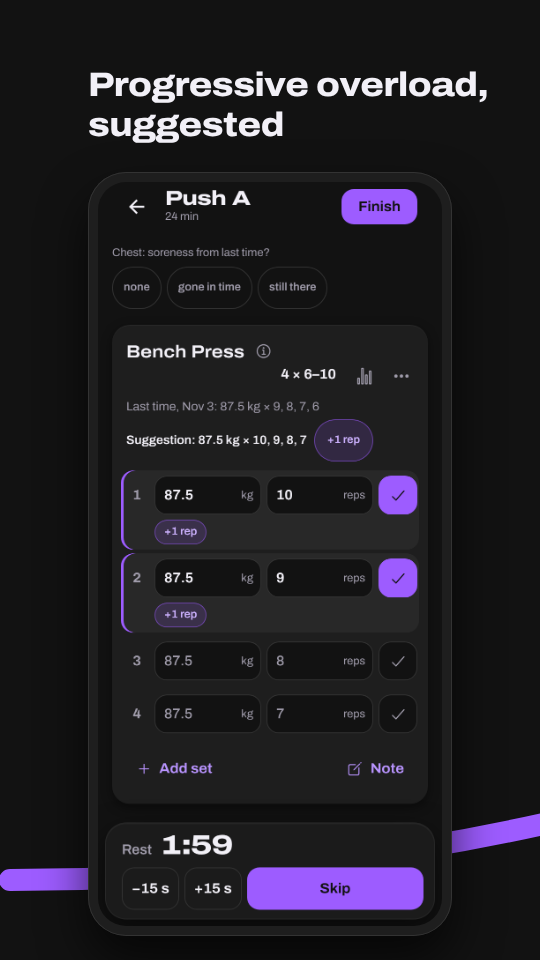
Your plan from a few questions, for 1 to 7 days a week: goal, experience, time per workout, your equipment, focus areas and favorite exercises; swap and add exercises yourself. A figure for every exercise in the catalog shows how it’s done. During a workout you see what you managed last time and a suggestion for your next sets. Warm-up and drop sets, RIR, notes, supersets, timed exercises like the plank and cardio with time and distance are logged the same way. Your feedback on soreness and joints adjusts your sets, deload weeks come if you want them, and you can catch up on a missed day. The training calendar shows your workout days and the muscle heatmap of the last 4 weeks, with Labform Pro over 3, 6 and 12 months.
Nutrition and body
A food diary with meals and water: over 7,000 foods from the German Nutrient Database (BLS), branded products from Open Food Facts and a barcode scanner, plus your own foods, recipes and saved meals. You see calories, macros and micronutrients, goals from your needs and reports over 7, 30 and 90 days. The weekly check-in looks back on calories and weight trend, and your calorie goal adjusts if you want; with Labform Pro also a diet break with an adjusted calorie goal. With Labform Pro you log a meal from a photo or a description: an AI estimates the foods and amounts, you check them and add them. Plus weight with a trend line, measurements from neck to calf and progress photos you compare side by side.
Recovery
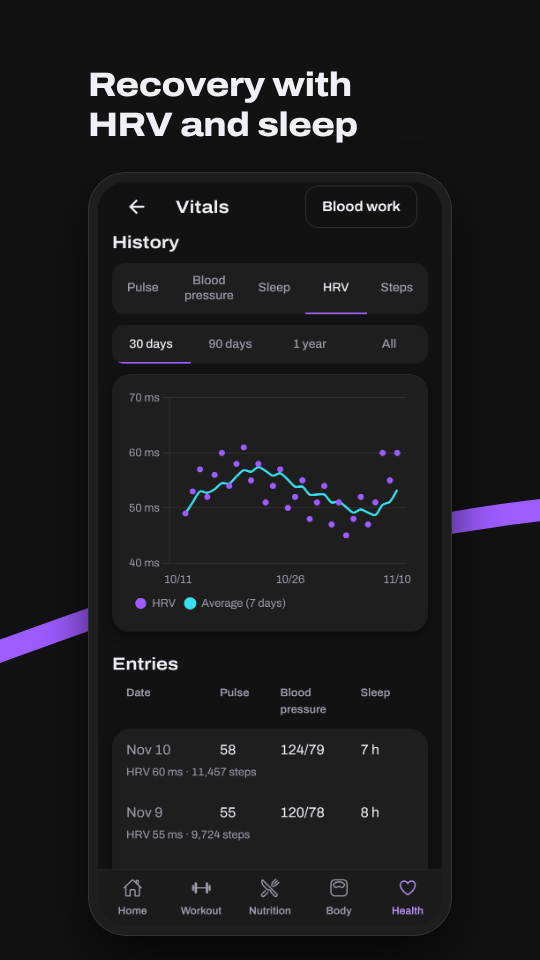
Resting heart rate, blood pressure, sleep, HRV, heart rate, oxygen saturation, respiratory rate, VO2max, steps and your watch’s workouts, from Health Connect if you like (you enter blood pressure yourself). The readiness score measures your sleep against 8 hours and compares your resting heart rate with your average over the last 7 days, and with Labform Pro your HRV too. A clearly raised respiratory rate lowers it, and the app tells you why.
Lab values
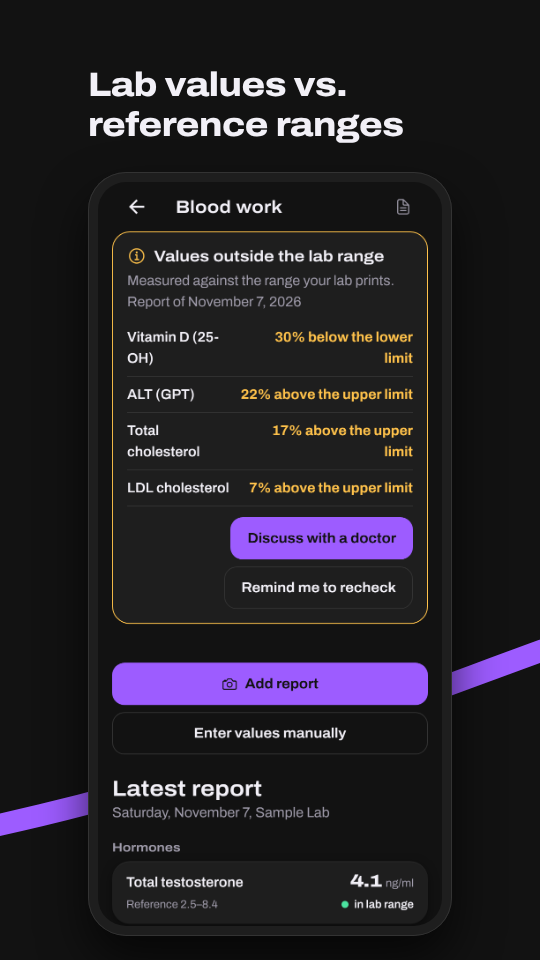
Enter your lab reports yourself or, with Labform Pro, have them read from a photo or PDF. Every value sits next to the reference range your lab prints on the report; values outside it come first, with the distance to the limit. With Labform Pro you can compare two lab reports.
Doctor’s report as PDF
With Labform Pro you take your lab values and their history to your doctor’s appointment as a PDF.
Supplement checklist
Tick off supplements, habits and daily goals every day, with a streak and a reminder if you want one. With Labform Pro you see the days you ticked off next to the history of a lab value, for your records only.
Your data
Your entries are stored on your phone; you don’t need an account. To switch phones, you export a backup file, with your progress photos if you like, or set up the cloud backup with an account. No ads.
Frequently asked questions
Where is my data stored?
On your phone; you don’t need an account. The version from the Play Store signs in to the Labform server with a random Labform ID, without a name or an email address; the server runs in a data center in Frankfurt am Main. The AI features of Labform Pro run through it, as do an optional account with the cloud backup, the invitations under “Invite friends” and, if you turn them on, usage statistics and crash reports without health values. For branded products the app asks Open Food Facts if you allow it; only the search term or the barcode goes there.
The cloud backup is end-to-end encrypted: only you can read it. It doesn’t contain lab report or progress photos; they stay on your phone. Labform shows no ads and contains no advertising or analytics services from other companies. You’ll find more in the privacy policy.
How much does Labform Pro cost, and is there a free trial?
Labform is free to download. You can use training, nutrition, body, recovery, lab values and the checklist without a subscription. Labform Pro is available as:
- An annual subscription for €49.99 a year. If you haven’t subscribed to Labform Pro before, you can try it free for 7 days first.
- A monthly subscription for €8.99 a month, without a trial.
- A founder offer for a one-time €129, without a subscription – for as long as Labform is offered; only until March 31, 2027 and for the first 500 purchases.
The price shown in the app and on Google Play before you buy applies. Labform Pro is currently only available in Germany, Austria, Liechtenstein and Luxembourg. It includes the doctor’s report as a PDF, comparing lab reports with the supplement days next to the history of a value, the diet break with an adjusted calorie goal, the muscle heatmap over 3, 6 and 12 months, recovery with HRV from Health Connect and, with an AI in the EU, reading lab reports, logging meals from a photo or a description and the weekly report, with the limits in the subscription terms, where everything else is too.
How do I cancel?
At any time in the Play Store under Payments & subscriptions › Subscriptions, or in Labform under Settings › Labform Pro › Manage subscription. Labform Pro stays unlocked until the end of the paid period, or, if you cancel during the trial, until the trial ends. Your data stays on your phone.
How does the AI work with my values?
The AI reads lab reports from photos or PDFs, estimates a meal from a photo or your description and, if you want, writes a weekly report, all with Labform Pro and only after your explicit consent; the app adds an estimated meal only once you have checked it. For this, the data goes through the Labform server to Google Cloud (Vertex AI) in the EU. The Labform server only passes it on and stores neither photos nor results. Google does not use the data to train its models, but under its terms it may log requests for a limited time to detect abuse. Values from Health Connect do not go to the AI. You report AI content that is wrong, inappropriate or dangerous right in the app with Report content.
You withdraw your consent in Settings under “Privacy”. In the test version for testers, the data goes directly to Google with your own Gemini key.
Do I need Health Connect?
No, you can also enter everything by hand. If you connect Health Connect, Labform reads what your watch, your scale and other apps put there: weight, body fat, sleep, resting heart rate, HRV, heart rate, steps, calories, workouts, calories eaten, water drunk and more, from the last 30 days and, if you allow it, up to 12 months back. You enter blood pressure yourself. Read-only: Labform writes nothing to Health Connect. “Disconnect” in Settings ends the sync.
Is Labform a medical device?
No. Labform does not make diagnoses and does not replace medical advice or treatment. The app shows your values and compares them with your own average, with 8 hours of sleep or with the reference range your lab prints. Discuss your values and decisions with your doctor.
Labform is for documenting fitness and well-being; it does not monitor or predict any disease and makes no treatment decisions. The full intended purpose is in the terms of use.
Get Labform
For Android 8 and later.
Contact
Questions and feedback to fabioamini4@gmail.com.
Labform is not a medical device and does not make diagnoses. Discuss your values and decisions with your doctor.